Support Forum
video uploads remain in pending status

Hi, Yael.
1. Make sure that you have FFMPEG library installed on your server
2. Make sure that you provided CORRECT path to FFMPEG library in Backend -> Components -> JomSocial -> Videos -> Video settings
3. Make sure that cron job works (try to fire cron job manually: Backend -> Components -> JomSocial -> Monitor -> Email Queue -> Execute cron (button upper right).
Please, read:
documentation.jomsocial.com/wiki/Video_L..._Upload_Requirements
documentation.jomsocial.com/wiki/Common_Video_Related_issues
- Instead of saying: 'it's not working', explain the problem in detail.
- Screenshots with the URL visible in them and the problem marked are more than welcome.
- Tell us how to replicate the problem, we can't fix it if we can't find it.
- Make sure that your site/server meets JomSocial System Requirements
- Make sure to setup JomSocial Cron Job
- Always provide us with access details to the backend and ftp. We need it to debug problems.
- If you have a similar problem, but a solution you found isn't working, open a new thread instead of 'merging' with an existing one.
- Use the "Thank You" feature on any post that helped you
I have checked everything and it looks complaint with your requirements. how ever video keeps in pending section. Also at video tab htere is several similar warnings
Warning: mysqli_close(): Couldn't fetch mysqli in /var/www/html/transgender.ru/public_html/libraries/joomla/database/driver/mysqli.php on line 210
Interestingly it can be played in pending section
new.transgender.ru/127-super-user/videos/mypendingvideos
Hi, Yael.
You can play it at it is already converted - in playable format.
I see that cron has issues running.
Please, contact with your hosting provider and ask if FFMPG is installed, if yes in which version... and if server suns on CentOS.
- Instead of saying: 'it's not working', explain the problem in detail.
- Screenshots with the URL visible in them and the problem marked are more than welcome.
- Tell us how to replicate the problem, we can't fix it if we can't find it.
- Make sure that your site/server meets JomSocial System Requirements
- Make sure to setup JomSocial Cron Job
- Always provide us with access details to the backend and ftp. We need it to debug problems.
- If you have a similar problem, but a solution you found isn't working, open a new thread instead of 'merging' with an existing one.
- Use the "Thank You" feature on any post that helped you
Hello,
It is my own server FFMPEG installed:
FFmpeg version 0.6.5, Copyright (c) 2000-2010 the FFmpeg developers
built on Jan 29 2012 17:52:15 with gcc 4.4.5 20110214 (Red Hat 4.4.5-6)
configuration: --prefix=/usr --libdir=/usr/lib64 --shlibdir=/usr/lib64 --mandir=/usr/share/man --incdir=/usr/include --disable-avisynth --extra-cflags='-O2 -g -pipe -Wall -Wp,-D_FORTIFY_SOURCE=2 -fexceptions -fstack-protector --param=ssp-buffer-size=4 -m64 -mtune=generic -fPIC' --enable-avfilter --enable-avfilter-lavf --enable-libdc1394 --enable-libdirac --enable-libfaac --enable-libfaad --enable-libfaadbin --enable-libgsm --enable-libmp3lame --enable-libopencore-amrnb --enable-libopencore-amrwb --enable-librtmp --enable-libschroedinger --enable-libspeex --enable-libtheora --enable-libx264 --enable-gpl --enable-nonfree --enable-postproc --enable-pthreads --enable-shared --enable-swscale --enable-vdpau --enable-version3 --enable-x11grab
libavutil 50.15. 1 / 50.15. 1
libavcodec 52.72. 2 / 52.72. 2
libavformat 52.64. 2 / 52.64. 2
libavdevice 52. 2. 0 / 52. 2. 0
libavfilter 1.19. 0 / 1.19. 0
libswscale 0.11. 0 / 0.11. 0
libpostproc 51. 2. 0 / 51. 2. 0
Hyper fast Audio and Video encoder
usage: ffmpeg [options] [[infile options] -i infile]... {[outfile options] outfile}...
Use -h to get full help or, even better, run 'man ffmpeg'
CentOS release 6.5 (Final)
Crontab:
SHELL=/bin/bash
PATH=/sbin:/bin:/usr/sbin:/usr/bin
MAILTO=root
HOME=/
# For details see man 4 crontabs
# Example of job definition:
# .
minute (0 - 59)
# | .
hour (0 - 23)
# | | .
day of month (1 - 31)
# | | | .
month (1 - 12) OR jan,feb,mar,apr ...
# | | | | .---- day of week (0 - 6) (Sunday=0 or 7) OR sun,mon,tue,wed,thu,fri,sat
# | | | | |
# * * * * * user-name command to be executed
10 * * * * root wget -O /dev/null " new.transgender.ru/index.php?option=com_community&task=cron " > /dev/null
What's wrong?
Hi, yael.
You use a VERY old version of FFMPEG library. Current one is 2.3.3.
Please, upgrade it and try again.
- Instead of saying: 'it's not working', explain the problem in detail.
- Screenshots with the URL visible in them and the problem marked are more than welcome.
- Tell us how to replicate the problem, we can't fix it if we can't find it.
- Make sure that your site/server meets JomSocial System Requirements
- Make sure to setup JomSocial Cron Job
- Always provide us with access details to the backend and ftp. We need it to debug problems.
- If you have a similar problem, but a solution you found isn't working, open a new thread instead of 'merging' with an existing one.
- Use the "Thank You" feature on any post that helped you
I have upgraded to
ffmpeg version 2.2.1 Copyright (c) 2000-2014 the FFmpeg developers
built on Apr 13 2014 13:00:18 with gcc 4.4.6 (GCC) 20120305 (Red Hat 4.4.6-4)
configuration: --prefix=/usr --libdir=/usr/lib64 --shlibdir=/usr/lib64 --mandir=/usr/share/man --enable-shared --enable-runtime-cpudetect --enable-gpl --enable-version3 --enable-postproc --enable-avfilter --enable-pthreads --enable-x11grab --enable-vdpau --disable-avisynth --enable-frei0r --enable-libopencv --enable-libdc1394 --enable-libgsm --enable-libmp3lame --enable-libnut --enable-libopencore-amrnb --enable-libopencore-amrwb --enable-libopenjpeg --enable-librtmp --enable-libspeex --enable-libtheora --enable-libvorbis --enable-libvpx --enable-libx264 --enable-libxavs --enable-libxvid --extra-cflags='-O2 -g -pipe -Wall -Wp,-D_FORTIFY_SOURCE=2 -fexceptions -fstack-protector --param=ssp-buffer-size=4 -m64 -mtune=generic -fPIC' --disable-stripping
libavutil 52. 66.100 / 52. 66.100
libavcodec 55. 52.102 / 55. 52.102
libavformat 55. 33.100 / 55. 33.100
libavdevice 55. 10.100 / 55. 10.100
libavfilter 4. 2.100 / 4. 2.100
libswscale 2. 5.102 / 2. 5.102
libswresample 0. 18.100 / 0. 18.100
libpostproc 52. 3.100 / 52. 3.100
Hyper fast Audio and Video encoder
but it did not change situation. Video is still in pending and Warning: mysqli_close(): Couldn't fetch mysqli in /var/www/html/transgender.ru/public_html/libraries/joomla/database/driver/mysqli.php on line 210 at "All video" tab
Hi, Yael.
I assign developer to this thread.
- Instead of saying: 'it's not working', explain the problem in detail.
- Screenshots with the URL visible in them and the problem marked are more than welcome.
- Tell us how to replicate the problem, we can't fix it if we can't find it.
- Make sure that your site/server meets JomSocial System Requirements
- Make sure to setup JomSocial Cron Job
- Always provide us with access details to the backend and ftp. We need it to debug problems.
- If you have a similar problem, but a solution you found isn't working, open a new thread instead of 'merging' with an existing one.
- Use the "Thank You" feature on any post that helped you
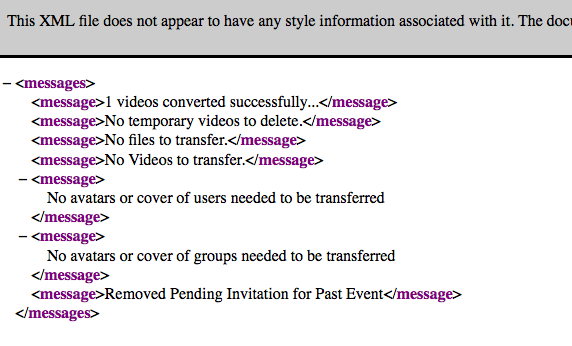
I do not know how the dB format influence on video conversion yet. But after you converted dB some of pages do not work at all. E.g. new.transgender.ru/videos
Is it possible to fix now?
Hi Yael,
the joomla database type setting is not related with video. basically MySQL and MySQLi are same.
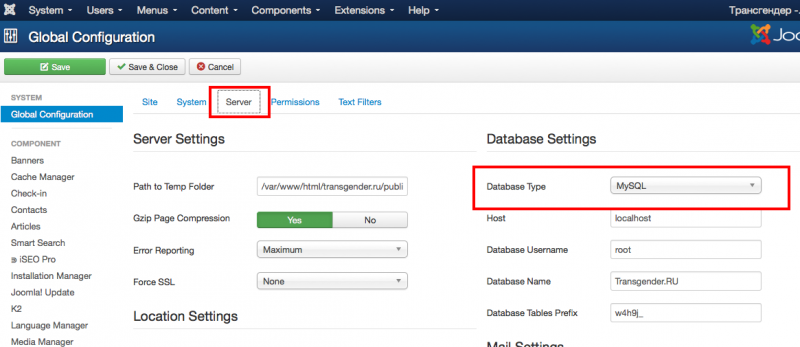
you can try to changing back to MySQLi
that video page will broken. seem that server issue. please provide me cpanel access detail, i want to see the errors log at your server.
Regards,
Albert
If dB is not related to video how was video encoded before database conversion?
There is no cpanel at the server. I can provide terminal access via ssh. How can I provide it safely?
Hi Yael,
video is binary file format, DB no related with video converting or encoding.
DB only stored file location. after that FFMPEG convert the video. to read video encoding we using php functions. at DB we only put video filename, location/path, belong to what users or groups.
can you provide me the errors log from your server. because I don't want to do anything at your server. server configuration/administration is not jomsocial scope support.
Regards,
Albert