Support Forum
after upgrade to 4.1.1 Configuration Layout Changes not being implemented

ISSUE SUMMARY:
Upgraded to 4.1.1 today
Make changes in JomSocial Configuration Layout, example: number of featured photos or groups. Changes not displaying on front page
STEPS TO REPLICATE:
1 login to admin
2 Jomsocial/Configuration/Layout
3 change featured display number of pics, videos, events to 1
4 goto dev website and view front page
5
RESULT
still displaying 10-20 featured photos or videos
EXPECTED RESULT
display 1 photo or video
BROWSER
Hi.
Please, unlock access to site backend:
i.prntscr.com/ca852bd5c2cd4e9f97e63fc6d78cd795.png
- Instead of saying: 'it's not working', explain the problem in detail.
- Screenshots with the URL visible in them and the problem marked are more than welcome.
- Tell us how to replicate the problem, we can't fix it if we can't find it.
- Make sure that your site/server meets JomSocial System Requirements
- Make sure to setup JomSocial Cron Job
- Always provide us with access details to the backend and ftp. We need it to debug problems.
- If you have a similar problem, but a solution you found isn't working, open a new thread instead of 'merging' with an existing one.
- Use the "Thank You" feature on any post that helped you
Hi.
I use Polish IP: 89.229.66.58... but it's dynamic... so today I have this IP... tomorrow it may be different.
- Instead of saying: 'it's not working', explain the problem in detail.
- Screenshots with the URL visible in them and the problem marked are more than welcome.
- Tell us how to replicate the problem, we can't fix it if we can't find it.
- Make sure that your site/server meets JomSocial System Requirements
- Make sure to setup JomSocial Cron Job
- Always provide us with access details to the backend and ftp. We need it to debug problems.
- If you have a similar problem, but a solution you found isn't working, open a new thread instead of 'merging' with an existing one.
- Use the "Thank You" feature on any post that helped you
HI.
That's nice but as I said: I use dynamic IP and today my IP is: 89.229.84.5
Sorry for inconvenience - but my Internet provider provide dynamic IP in my payplan.
- Instead of saying: 'it's not working', explain the problem in detail.
- Screenshots with the URL visible in them and the problem marked are more than welcome.
- Tell us how to replicate the problem, we can't fix it if we can't find it.
- Make sure that your site/server meets JomSocial System Requirements
- Make sure to setup JomSocial Cron Job
- Always provide us with access details to the backend and ftp. We need it to debug problems.
- If you have a similar problem, but a solution you found isn't working, open a new thread instead of 'merging' with an existing one.
- Use the "Thank You" feature on any post that helped you
I understand.
Normally in these situations I coordinate a window of time to work together.
I am available 8AM - Midnight EST/EDT.
Let me know the time you are available and I will post up then. For example 8AM-4PM Warsaw time
thanks
HI.
That is correct, I'm on forum 8AM-4PM Warsaw time.
- Instead of saying: 'it's not working', explain the problem in detail.
- Screenshots with the URL visible in them and the problem marked are more than welcome.
- Tell us how to replicate the problem, we can't fix it if we can't find it.
- Make sure that your site/server meets JomSocial System Requirements
- Make sure to setup JomSocial Cron Job
- Always provide us with access details to the backend and ftp. We need it to debug problems.
- If you have a similar problem, but a solution you found isn't working, open a new thread instead of 'merging' with an existing one.
- Use the "Thank You" feature on any post that helped you
Hi.
I assign developer to this thread.
- Instead of saying: 'it's not working', explain the problem in detail.
- Screenshots with the URL visible in them and the problem marked are more than welcome.
- Tell us how to replicate the problem, we can't fix it if we can't find it.
- Make sure that your site/server meets JomSocial System Requirements
- Make sure to setup JomSocial Cron Job
- Always provide us with access details to the backend and ftp. We need it to debug problems.
- If you have a similar problem, but a solution you found isn't working, open a new thread instead of 'merging' with an existing one.
- Use the "Thank You" feature on any post that helped you
Hi,
sorry, what do you mean with "featured display number", at your dev site under all photos, all videos, and all events page.
there is no any featured items.
e.g:
please login with administrator user at site frontend, open all videos page, click on options. you can see "feature this" option.
with that why you can make featured video. same way with photos and events.
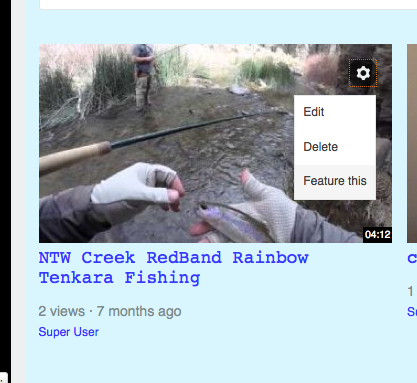
Regards
This dev site is an upgrade from an existing site that had featured videos and photos.
Do I now have to manually reset all the featured videos and photos?
Also, did you modify any backend settings or cleanup files after upgrade?
I ask because caching is disabled and watermarks are now working.