Support Forum
Missing Modules

Hi Santa,
could you please upload your site to server? so I can access your site and have a look the issue straightly.
by default jomsocial modules and plugins will be installed, and you need to activate it and setup it at joomla extensions manager.
FYI: please edit your first post at this topic, and put it any credentials information at site info form.
Regards

Hi Albertus,
Hm, your ip was not locked. Probably I understand wrong :
You may login to the site's admin or you need the acces to the server ?
The site-admin has been working and the acces codes are ok. Falls you can not acess to the backend then we have got a new problem.
Regards
Hi Santa,
I still cannot access site admin (joomla backend), got forbidden. but no problem at frontend. it must be IP blocker at administrator section. htaccess maybe? please contact server support for that.
I saw your frontend. there are jomsocial modules at there. could you please explain in more detail, what do you mean with missing module? what modules are missing.
FYI: if I still blocked to site admin access, I will pass this topic to other support staff in other country.
Regards
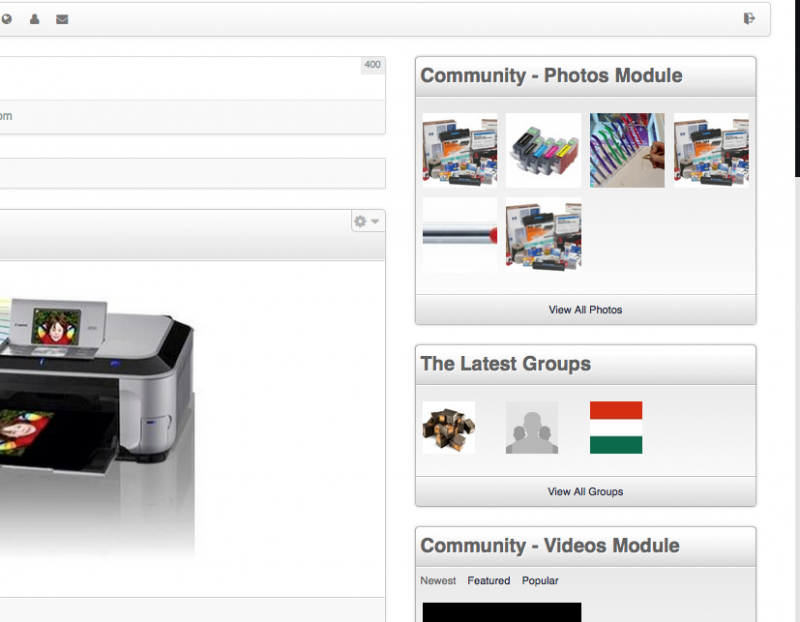
Hi Albertus,
I was contacted my provider again : your ip has free acces to the backend.
In the backend go to Modules and try to find any jomsocial modules - nothing to find.
Yes, on the frontend there are Jomsoc. modules : that is why I contacted you.
Await for your response.
Regards
( other country can have the same problem with ip - your is now free
Hi, Santa.
I can't access your site backend:
prntscr.com/5vxn70
In frontent, after I log in, I could see at least two JomSocial modules:
prntscr.com/5vxnnr
For some reaso you may not see them in backend - as you report. But we need to be able to get into your site backend... without it we can't help you.
Please, contact with your hosting provider and report 403 error when accessing /administrator folder. Please check chmod of this folder.
Also edit your first post and add FTP credentials.
- Instead of saying: 'it's not working', explain the problem in detail.
- Screenshots with the URL visible in them and the problem marked are more than welcome.
- Tell us how to replicate the problem, we can't fix it if we can't find it.
- Make sure that your site/server meets JomSocial System Requirements
- Make sure to setup JomSocial Cron Job
- Always provide us with access details to the backend and ftp. We need it to debug problems.
- If you have a similar problem, but a solution you found isn't working, open a new thread instead of 'merging' with an existing one.
- Use the "Thank You" feature on any post that helped you
Hi, Santa.
I've sent you my IP in PM.
- Instead of saying: 'it's not working', explain the problem in detail.
- Screenshots with the URL visible in them and the problem marked are more than welcome.
- Tell us how to replicate the problem, we can't fix it if we can't find it.
- Make sure that your site/server meets JomSocial System Requirements
- Make sure to setup JomSocial Cron Job
- Always provide us with access details to the backend and ftp. We need it to debug problems.
- If you have a similar problem, but a solution you found isn't working, open a new thread instead of 'merging' with an existing one.
- Use the "Thank You" feature on any post that helped you
Hi, Santa.
All modules are available. When I clicked "New" I could see them on the list:
prntscr.com/5vyvr4
Also some of them are active already:
prntscr.com/5vyw0q
(here is Important Events module that is Community - Events Module ).
Here you have even more:
prntscr.com/5vywh8
.
And here are plugins:
prntscr.com/5vywop
So everything seems to be fine. Just make sure:
- modules/plugins that you want to use/display are enabled
- modules are set to Public/Registered (depends for who you want to display them)
- modules are assigned to proper module positions
- modules are assigned to proper menu items (or displayed for all menu items).
- Instead of saying: 'it's not working', explain the problem in detail.
- Screenshots with the URL visible in them and the problem marked are more than welcome.
- Tell us how to replicate the problem, we can't fix it if we can't find it.
- Make sure that your site/server meets JomSocial System Requirements
- Make sure to setup JomSocial Cron Job
- Always provide us with access details to the backend and ftp. We need it to debug problems.
- If you have a similar problem, but a solution you found isn't working, open a new thread instead of 'merging' with an existing one.
- Use the "Thank You" feature on any post that helped you