Support Forum
Update to 3.2.0.6 - Fatal error: Class 'CAssets' not found
-

Topic Author - Rolf Würgler
- Offline
- Junior Boarder
- Posts: 100
- Thank you received: 2
Licenses:
JomSocial Active
Joomla 3.3.1
After update i get the following error on frontend:
Fatal error: Class 'CAssets' not found in "components/com_community/views/views.php on line 32"
Any idea Magic Mike?
regards
Wuegi
Hi, Rolf.
It seems to be an epidemic :) Please, hold on I need to ask developers.
I'll be back to you ASAP.
- Instead of saying: 'it's not working', explain the problem in detail.
- Screenshots with the URL visible in them and the problem marked are more than welcome.
- Tell us how to replicate the problem, we can't fix it if we can't find it.
- Make sure that your site/server meets JomSocial System Requirements
- Make sure to setup JomSocial Cron Job
- Always provide us with access details to the backend and ftp. We need it to debug problems.
- If you have a similar problem, but a solution you found isn't working, open a new thread instead of 'merging' with an existing one.
- Use the "Thank You" feature on any post that helped you
Hi, Rolf.
Please check FTP credentials.
I need to edit some files.
Edit your first post and correct FTP credentials.
- Instead of saying: 'it's not working', explain the problem in detail.
- Screenshots with the URL visible in them and the problem marked are more than welcome.
- Tell us how to replicate the problem, we can't fix it if we can't find it.
- Make sure that your site/server meets JomSocial System Requirements
- Make sure to setup JomSocial Cron Job
- Always provide us with access details to the backend and ftp. We need it to debug problems.
- If you have a similar problem, but a solution you found isn't working, open a new thread instead of 'merging' with an existing one.
- Use the "Thank You" feature on any post that helped you
-
Topic Author - Rolf Würgler
- Offline
- Junior Boarder
- Posts: 100
- Thank you received: 2
Licenses:
JomSocial Activedone.. username was wrong... Sorry...
-
Topic Author - Rolf Würgler
- Offline
- Junior Boarder
- Posts: 100
- Thank you received: 2
Licenses:
JomSocial ActiveAny news on this?
Hi, Rolf.
No, still I can't log in...
Ok, you'll need to edit file yourself.
Go to that file ROOT/components/com_community/views/views.php on line 32
Change:
CAssets::attach -> CFactory::attach
- Instead of saying: 'it's not working', explain the problem in detail.
- Screenshots with the URL visible in them and the problem marked are more than welcome.
- Tell us how to replicate the problem, we can't fix it if we can't find it.
- Make sure that your site/server meets JomSocial System Requirements
- Make sure to setup JomSocial Cron Job
- Always provide us with access details to the backend and ftp. We need it to debug problems.
- If you have a similar problem, but a solution you found isn't working, open a new thread instead of 'merging' with an existing one.
- Use the "Thank You" feature on any post that helped you
-
Topic Author - Rolf Würgler
- Offline
- Junior Boarder
- Posts: 100
- Thank you received: 2
Licenses:
JomSocial Active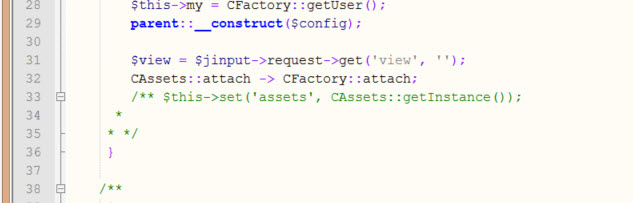
-
Topic Author - Rolf Würgler
- Offline
- Junior Boarder
- Posts: 100
- Thank you received: 2
Licenses:
JomSocial ActiveFTP Server has other Port for international connects ;-) Look into my first post ;-)
-
Topic Author - Rolf Würgler
- Offline
- Junior Boarder
- Posts: 100
- Thank you received: 2
Licenses:
JomSocial Active
Site still down! :-(
Please, can you fix this?
Regards
Rolf
Hi, Rolf.
I was able to connect via FTP. But then it seems I have chown issues there.
I rolled back your changes.
But after I uploaded original file... your site was gone for me as usual...
But I changed code on my local and then uploaded to your server.
Is site up?
- Instead of saying: 'it's not working', explain the problem in detail.
- Screenshots with the URL visible in them and the problem marked are more than welcome.
- Tell us how to replicate the problem, we can't fix it if we can't find it.
- Make sure that your site/server meets JomSocial System Requirements
- Make sure to setup JomSocial Cron Job
- Always provide us with access details to the backend and ftp. We need it to debug problems.
- If you have a similar problem, but a solution you found isn't working, open a new thread instead of 'merging' with an existing one.
- Use the "Thank You" feature on any post that helped you
-
Topic Author - Rolf Würgler
- Offline
- Junior Boarder
- Posts: 100
- Thank you received: 2
Licenses:
JomSocial Active
I don't know why you have such problems with ftp. I work since years for many hours per day on this server infrastgructure and i had never had such issues.... hmmmm... :-(
Now i get...
Warning: Missing argument 1 for CFactory::attach(), called in /home/www/web26/html/bm32/components/com_community/views/views.php on line 32 and defined in /home/www/web26/html/bm32/components/com_community/libraries/core.php on line 959
Warning: Missing argument 2 for CFactory::attach(), called in /home/www/web26/html/bm32/components/com_community/views/views.php on line 32 and defined in /home/www/web26/html/bm32/components/com_community/libraries/core.php on line 959
Fatal error: Class 'CAssets' not found in /home/www/web26/html/bm32/components/com_community/libraries/core.php on line 960
-
Topic Author - Rolf Würgler
- Offline
- Junior Boarder
- Posts: 100
- Thank you received: 2
Licenses:
JomSocial ActiveAny news on this? My users getting angry...
Hi, Rolf.
You can ignore Warnings as they don't influence system performance.
Fatal error: Class 'CAssets' not found in /home/www/web26/html/bm32/components/com_community/libraries/core.php on line 960
This is different than previous one... I'll update you with fix ASAP.
- Instead of saying: 'it's not working', explain the problem in detail.
- Screenshots with the URL visible in them and the problem marked are more than welcome.
- Tell us how to replicate the problem, we can't fix it if we can't find it.
- Make sure that your site/server meets JomSocial System Requirements
- Make sure to setup JomSocial Cron Job
- Always provide us with access details to the backend and ftp. We need it to debug problems.
- If you have a similar problem, but a solution you found isn't working, open a new thread instead of 'merging' with an existing one.
- Use the "Thank You" feature on any post that helped you
Hi, Rolf.
Second error was caused by XIUS extension. I disabled it and your site is up! :)
Please contact with XIUS developers.
- Instead of saying: 'it's not working', explain the problem in detail.
- Screenshots with the URL visible in them and the problem marked are more than welcome.
- Tell us how to replicate the problem, we can't fix it if we can't find it.
- Make sure that your site/server meets JomSocial System Requirements
- Make sure to setup JomSocial Cron Job
- Always provide us with access details to the backend and ftp. We need it to debug problems.
- If you have a similar problem, but a solution you found isn't working, open a new thread instead of 'merging' with an existing one.
- Use the "Thank You" feature on any post that helped you